Key Takeaways
These five critical SEO mistakes are silently destroying your search rankings, but each one can be fixed quickly with the right approach:
• Target long-tail keywords over generic terms – Long-tail keywords convert at 36% vs 11.45% for broad terms and face dramatically less competition
• Prioritize content quality over quantity – Thin, low-quality content triggers site-wide penalties that reduce visibility for your entire website
• Optimize local SEO signals immediately – 76% of local mobile searches lead to store visits within 24 hours, yet only 35% of businesses claim their Google profiles
• Fix site speed for better rankings – Pages loading in 1 second convert 3x higher than 5-second loads, and 53% of mobile users abandon slow sites
• Build strategic internal link structure – Contextual internal links help search engines discover content and distribute authority throughout your site
The websites outranking you aren’t necessarily better – they simply avoid these fundamental mistakes that tank search performance.
Most SEO mistakes are completely preventable, yet more than 60% of small businesses don’t have an SEO strategy. So they’re losing traffic and revenue to competitors who get the basics right.
We’ve identified the most common SEO mistakes to avoid that are likely tanking your rankings right now. These errors directly affect where you appear in search results. Wrong keyword targeting and ignored site speed are just two examples.
In this piece, we’ll break down the top SEO mistakes to avoid and show you exactly how to fix them fast.
Targeting the Wrong Keywords
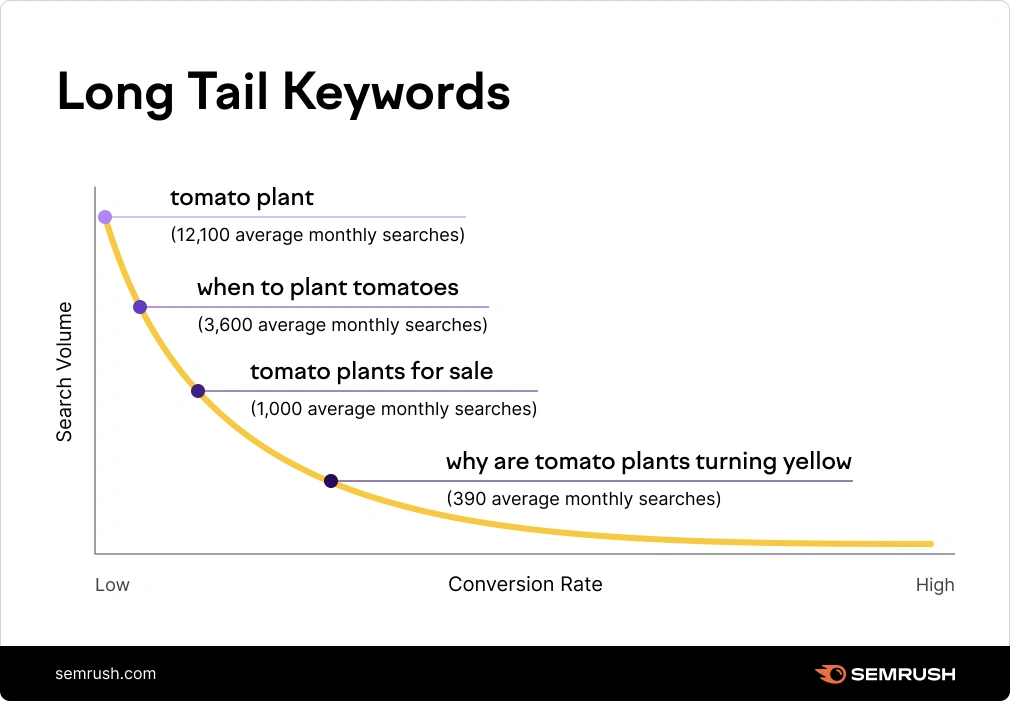
Image Source: Semrush
Chasing high-volume keywords without thinking over competition or intent is one of the top SEO mistakes you should avoid. Generic terms might look impressive in your analytics dashboard, but they rarely deliver the qualified traffic that converts.
The Problem with Generic Keywords
Short-tail keywords like “running shoes” or “coffee” attract massive search volumes and come with brutal competition. These broad terms rarely indicate what a searcher wants. Someone typing “fans” could be looking for industrial ventilation equipment, a small desk fan, or football supporter communities.
Generic keywords face another critical issue: unclear intent. Search engines struggle to determine what users need when queries contain one or two words. A search for “spicy food” might pull up recipe blogs, restaurant listings and health articles all on the same results page. You’re competing against every possible interpretation of that term without specificity.
Short-tail keywords also attract users in the early research phase, not those ready to take action. They’re still in what some marketers call the “diapers” stage of the purchase decision. You can nurture these visitors over time, but they won’t contribute to your conversion goals right away.
Why Long-Tail Keywords Win
Long-tail keywords are precise search queries that contain three or more words. You’d focus on “women’s running shoes for flat feet” or “barefoot running shoes wide toe box” instead of targeting “running shoes”. These specific phrases transform your SEO performance.
The competition drops with longer queries. Long-tail keywords attract low competition for two main reasons: their specificity makes them relevant to fewer websites, and their lower search volumes draw less marketing investment from competitors. Ranking for these terms becomes straightforward compared to fighting for position on generic keywords.
Conversion rates tell the real story. Long-tail keywords convert at an average rate of 36%. The highest-performing landing pages only achieve conversion rates of 11.45%. Users searching for specific terms know what they want and are almost ready to take action.
Voice search amplifies the importance of long-tail keywords. You use conversational language with natural phrasing when you talk to Alexa or Siri. AI-powered virtual assistants feature natural language processing that comprehends these conversational-style queries. Search behavior has shifted away from robotic phrases like “pest control service NYC” toward full questions like “What’s the best way to get rid of roaches in a Brooklyn apartment?”.
Long-tail keywords also boost your visibility in AI-generated responses. People participate with AI systems by inputting specific queries. Your content aligns with users’ natural language and influences AI responses when you use long-tail keywords.
The collective power of long-tail keywords often surpasses single competitive terms. Individual long-tail queries might have lower volume. Grouping them together based on search intent creates high collective search volumes. You reach a larger audience than focusing on a single keyword alone by targeting these grouped keywords on the same page.
How to Fix Your Keyword Strategy
Start by exploring your current keyword list. You’re targeting the wrong opportunities if it’s dominated by one or two-word terms with sky-high search volumes. Search volume doesn’t equal traffic potential, especially when AI overviews, Reddit threads and high-authority sites dominate the results.
Change your focus to keywords that balance specificity with realistic ranking potential. Think about how your ideal customer phrases their questions. Explore “organic coffee beans for espresso” or “best coffee beans for french press” instead of “coffee beans”.
Finding long-tail keywords requires a systematic approach:
- Use Google’s autocomplete predictions: The search bar provides suggestions based on real searches and offers immediate long-tail keyword ideas
- Check People Also Ask boxes: These questions related to user searches are excellent examples of long-tail keywords people use
- Analyze your current rankings: Look at positions 11-30 in Google Search Console to find long-tail terms you already rank for on pages two or three
- Study competitor keywords: Tools like Semrush’s Organic Rankings reveal which long-tail terms your competitors target
- Explore online communities: Reddit and Quora are goldmines for conversational long-tail keywords, especially as AI search causes users to ask more natural questions
- Ask AI chatbots: ChatGPT can provide long-tail keyword ideas, though it lacks access to real search engine data
Match your content to search intent once you identify promising long-tail keywords. Commercial and transactional intent keywords deliver the best ROI. A query like “men’s X-Brand running shoes size 12 Toronto” signals someone much closer to purchase than a generic “running shoes” search.
Tools for Better Keyword Research
Semrush’s Keyword Magic Tool provides the easiest path to finding long-tail keywords. It searches a database of 27.2 billion keywords and lets you filter based on various metrics. The tool helps you identify search volume, competition levels and keyword difficulty scores specific to your situation.
Google Search Console gives you analytical insights into keywords visitors already use to find your website. Check the Performance report, click Queries and sort results by position to discover ranking opportunities you’re missing.
Free options exist for those just starting out. KWFinder limits you to five searches per day on the free plan, but each search delivers extensive data including monthly search volume, keyword difficulty, related keywords and searcher intent for each term. Ubersuggest offers keyword overview tools with monthly search volume broken down by country, plus SEO and paid difficulty scores.
The key is using these tools to inform decisions, not dictate them. Keyword difficulty scores provide rough estimates but don’t account for your specific site’s domain authority. Manually audit how your website stacks up against current top-ranking pages for any keyword you’re thinking over.
Publishing Low-Quality Content (Top SEO Mistake)
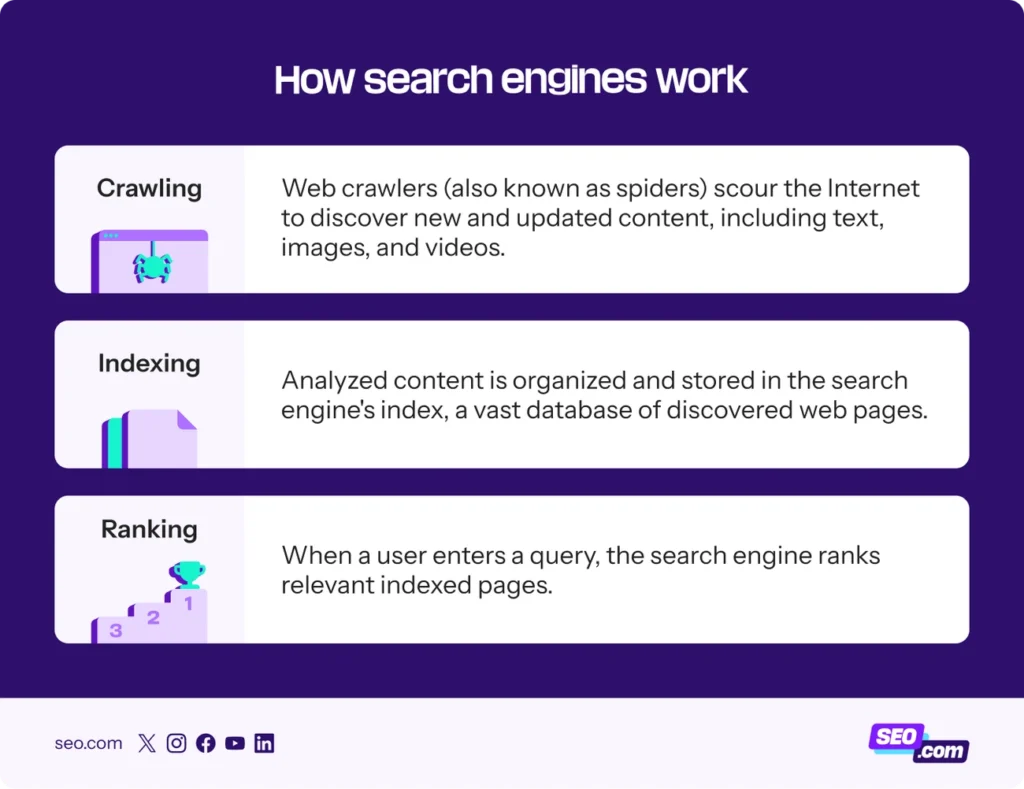
Image Source: SEO.com
Publishing content that fails to meet quality standards represents one of the most damaging common SEO mistakes you can make. Search engines prioritize content that people find compelling and useful, and this factor influences your website’s presence in search results more than almost any other optimization tactic.
What Counts as Low-Quality Content
Google’s Search Quality Evaluators Guidelines provide the framework to understand what constitutes low-quality content. These guidelines define low-quality content as pages that don’t achieve their purpose well because they lack an important dimension or have a problematic aspect.
Google defines two distinct tiers. “Lowest-quality” content is harmful with no value whatsoever. “Low-quality” content refers to pages that may have beneficial purposes but lack adequate information. The difference matters because the penalties differ.
Lowest-quality pages trigger the harshest treatment. Search evaluators flag content as lowest-quality when the page is hacked, defaced or spammed, when the main content is copied or auto-generated without adequate effort, when the page title is exaggerated or misleading, when ads obstruct the main content, or when the page lacks authorship for topics that need trust.
Low-quality content exhibits different but still problematic characteristics. Pages fall into this category when the content creator lacks experience with topics they write about, similar to someone reviewing a product they never used. The content creator might lack expertise in the topic, like trying to write about car maintenance without knowledge, or the website itself might not be an authority on the subject.
Thin content represents a major red flag. Pages with very little text, articles written just for search engines rather than humans, duplicate or near-duplicate content, and auto-generated or AI-spun articles without proper editing all qualify as thin content that search engines will flag. The Panda algorithm update introduced widespread awareness of thin content as a ranking problem back in 2011.
The distinction isn’t about word count alone. A 100-word page that answers a specific query is not thin content. A 1,500-word page stuffed with repetitive generalities that says nothing useful is. The question centers on whether the page serves the user who found it.
Keyword stuffing remains against Google’s spam policies. Repeating the same words over and over, even in variations, tires users and signals manipulation rather than helpfulness. Pages with awkward phrasing like “best SEO LA digital SEO expert LA best SEO expert LA” get detected and penalized.
How Search Engines Detect Quality Issues
User behavior signals provide search engines with direct feedback about content quality. Time on site, pages per session and bounce rate all influence website rankings. When you provide high-quality content, readers spend more time on your webpage and interact with links, watch videos and explore additional pages.
Dwell time affects SEO ranking strongly. When visitors stay for a long time on the website to consume information, dwell time increases. When users leave your page fast because it takes too long to load or fails to answer their questions, the resulting high bounce rate signals quality problems.
Search engines assess specific elements of content quality: originality, depth and accuracy. Unique, well-researched articles that address user queries perform better than generic or duplicate content. The algorithms can distinguish between content written by an amateur and content written by a professional.
E-E-A-T criteria play a significant role in quality evaluation. The framework stands for Experience, Expertise, Authoritativeness and Trustworthiness. A lack of E-E-A-T cannot be compensated for by a positive reputation. Search evaluators check whether the content creator writes about topics they have no experience with, whether they lack expertise in the subject, whether the website is credible, and whether the site provides studies or sources to support its claims.
Google’s Helpful Content system operates as a site-wide signal. A large proportion of unhelpful content on a site reduces the visibility of the entire site, not just the thin pages. Any content on sites determined to have high amounts of unhelpful content overall is less likely to perform well in search, assuming there is other content elsewhere from the web that’s better to display.
Content Quality Fixes That Work Fast
Start by running a complete audit of your existing content. Identify pages with thin content, excessive keyword stuffing or grammatical errors. This audit serves as the foundation for your improvement efforts.
Use three sources together for the quickest auditing. Run a Screaming Frog crawl filtered by word count and export all indexed pages, then filter for pages under 300 words and review them one by one. Check Google Search Console’s Performance report for pages that have impressions but zero or very low clicks over the past three months. Filter for indexed pages with zero impressions over six months to find pages being crawled but not appearing for any query.
Every thin content page falls into one of three categories that need different responses. Expand pages when the topic has genuine search demand and ranking potential but doesn’t yet provide enough depth. The expansion should focus on adding information that is genuinely useful, not just padding word count. Add complete FAQ sections, real examples, step-by-step processes where missing, or data and context that competitors haven’t covered.
Consolidate when multiple pages on the same site cover the same topic at shallow depth. Merge them into a single, authoritative page with 301 redirects from the removed URLs. This approach concentrates the ranking signal, eliminates internal competition and produces one page that can rank rather than three that cannot.
Remove pages when they have no search value, no backlinks worth preserving and no realistic path to becoming useful. Noindexing the page removes it from Google’s index while keeping the URL available, or delete it and set a 301 redirect to the closest relevant page.
Optimize for user intent by understanding what’s behind user searches and tailoring your content to meet those needs. Focus on providing solutions and valuable information that line up with what users seek. Content should be action-oriented and concise while maintaining readability with varying sentence structure, shorter paragraphs and clear formatting.
Proofread your content to correct grammatical errors, spelling mistakes or awkward phrasing. This attention to detail boosts professionalism. Emphasize the uniqueness of your content by avoiding duplicating material from other sources and striving to offer a fresh view or unique insights that set your content apart.
Regular content refreshes prevent traffic from dropping to zero. All content withers over time, and a content refresh can change a traffic trend from negative to positive. Check in on content you published before and update it as needed, or delete it if it’s not relevant anymore.
Forgetting Local SEO Signals
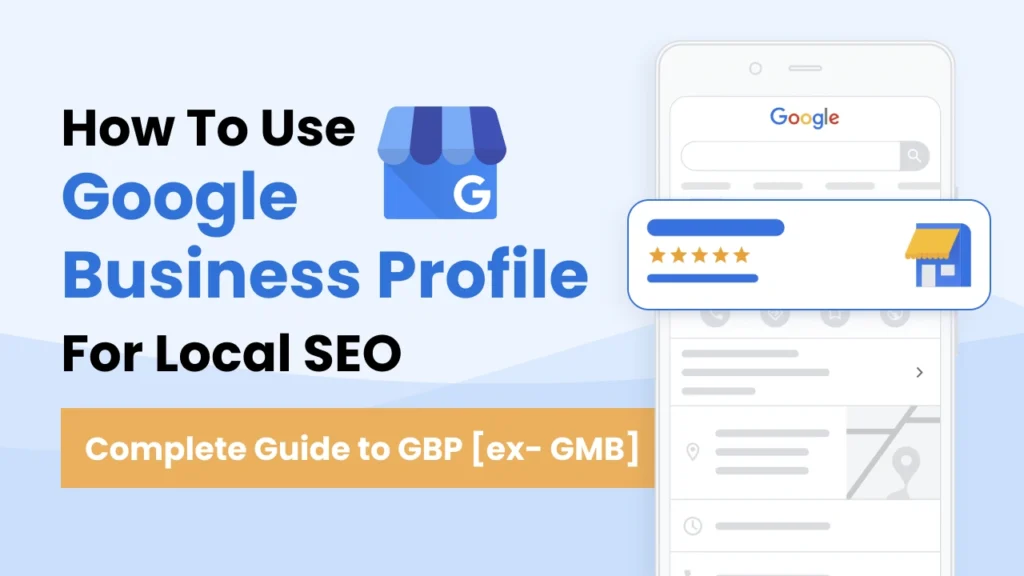
Image Source: Zenbrief
Local searches drive 76% of smartphone users to visit a related business within a day. 28% of those searches result in a purchase. Businesses that overlook local SEO signals lose direct access to ready-to-buy customers in their area. This remains one of the most common SEO mistakes to avoid.
Why Local SEO Matters for Rankings
Google evaluates local businesses using three main factors: relevance, distance, and prominence. Relevance measures how well your Business Profile matches what someone searches for. Distance refers to how far each business sits from the searcher’s location. Prominence reflects how prominent your business appears based on information like review quantity, positive ratings, and website links pointing to your business.
These factors determine whether you appear in Google’s Local Pack. The map-based results show the top three local businesses for a query. Getting into this Local Pack matters. The first result on Google gets an average click-through rate of 27.6%. Local searches carry high intent since users need a product or service right away. This translates to higher conversion rates than general searches.
Mobile behavior amplifies the importance of local SEO. Mobile searches for “store open near me” grew by more than 250% between 2020 and 2022. “Where to buy” and “near me” keyword searches grew by more than 200% in that same period. Consumers are 40% more likely to appear in the local pack when their business has consistent NAP data across major citation sources.
Common Local SEO Mistakes to Avoid
The most fundamental error is failing to claim your Google Business Profile. A survey of 778 SMB owners revealed that only 35% have Google Business Profiles. Google creates listings on its own, but without claiming yours, the information contains inaccuracies that hurt your rankings.
Choosing incorrect categories ranks as the number one negative ranking factor according to the Local Search Ranking Factors survey. Categories influence which searches trigger your listing. Picking the wrong main category or failing to add relevant additional categories hands visibility to competitors. Research found that businesses using four additional categories within their Google Business Profiles have the highest average map ranking of 5.9.
Google gets confused by inconsistent NAP information across directories. This damages trust. Your business name, address, and phone number must match exactly across all platforms. Even minor variations like “Street” versus “St.” create discrepancies that weaken your local rankings. Studies show 62% of consumers would avoid using a business if they found incorrect information online.
Review neglect costs you rankings and conversions. Reviews are now the second most important factor for Local Pack ranking. Not responding to any reviews represents a critical mistake. Research indicates 89% of consumers would use a local business that responds to both positive and negative reviews. The average customer expects a response within four hours.
Google Business Profile Optimization
Businesses with complete and accurate information show up more often in local search results. Start by verifying your listing, then fill out every available field. Include your full address, phone number, business category, and details like parking or Wi-Fi availability.
Upload high-quality photos at minimum 720 pixels wide by 720 pixels tall in JPG or PNG format. Add your company logo and cover photo at minimum. Businesses that add photos to their profile receive more website clicks and direction requests.
Select your main category with care, then add up to nine additional categories that describe your business. Categories appear in the top portion of your Business Profile and affect which searches display your listing.
Use Google Posts to share updates about your business. This includes blog posts, upcoming events, promotions, and videos. You can add call-to-action buttons to these posts. Posting on a regular basis signals to Google that your business stays active.
Request reviews from satisfied customers by sending them a direct link Google provides. Respond to every review, especially negative ones. 89% of consumers expect a response. Failing to reply damages your reputation. Owner responses show your page is managed and that you participate with customers.
How to Fix Local SEO Issues Quickly
Audit your NAP consistency across all directories where your business appears. Use tools like Semrush’s Review Management that scan over 70 directories to identify inconsistencies. Correct any variations right away. Your business name, address, and phone number must appear identically everywhere.
Implement local schema markup using Google’s Structured Data Markup Helper. Choose “Local Businesses,” enter your URL, then highlight sections you want to mark up and select appropriate schema elements. Copy the generated HTML markup into the head tag of your pages. Schema helps search engines understand your business location and offerings.
Create dedicated landing pages for each business location if you operate multiple sites. Include location-specific keywords in headings, body content, and meta tags. Embed Google Maps on each page, add the local phone number, describe services at that location, and introduce the team. These location pages help Google recognize each site as a distinct entity.
Optimize for local keywords by incorporating city names, neighborhoods, and regional terms into your content in a natural way. Someone searching “best pizza near me” uses different language than “wood-fired pizza downtown Portland.” Match your content to these conversational local queries.
Track your Google Business Profile performance monthly at minimum using the built-in Performance dashboard. Monitor how customers find your profile, actions they take, common search terms leading to your business, and how many people request directions. This data reveals which optimizations work and where gaps remain.
Overlooking Site Speed and User Experience
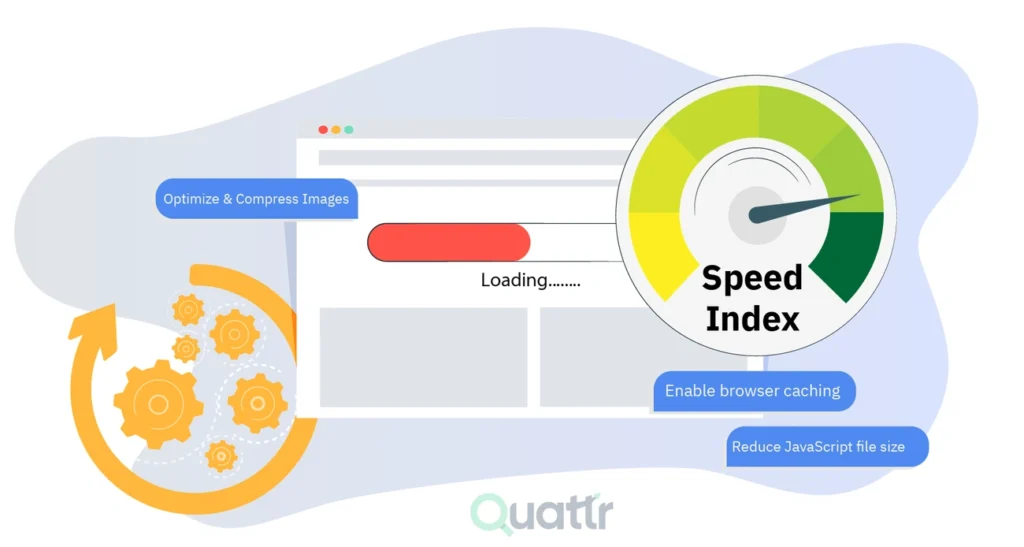
Image Source: Quattr
“Focus on the user and all else will follow.” — Google, Google Inc., search engine leader and industry standard-setter
Site speed affects every aspect of your search performance, from rankings to revenue. Google confirmed site speed as a ranking factor back in 2010, and the Speed Update in 2018 extended this to mobile search results. Core Web Vitals became part of the algorithm in 2021. Speed optimization matters, and skipping it ranks among the worst on-page SEO mistakes you can make.
How Page Speed Kills Rankings
Page load times relate to organic rankings and conversion rates. Sites loading in one second convert three times higher than those with five-second load times. Equally concerning, load time that goes from two seconds to three seconds causes a 50% increase in visitor bounces.
The numbers get worse as delays increase. Research shows 53% of mobile users abandon sites that take longer than three seconds to load. The probability of bouncing jumps to 90% after five seconds. Slow page speed could mean the difference between revenue and nothing when someone tries checking out from an online store.
Page speed affects rankings both ways. Google uses it as a confirmed ranking factor, but slow loading also increases bounce rates and reduces dwell time, which signals poor user experience to search algorithms. Sites with sub-par speed metrics can still rank if their content proves most helpful. When multiple sites offer great content though, a few milliseconds could separate first position from getting lost further down the page.
Core Web Vitals and Their Impact
Google combines three primary metrics called Core Web Vitals to assess performance. Largest Contentful Paint (LCP) measures how long a page takes to load, with Google recommending 2.5 seconds as the threshold for good user experience. Interaction to Next Paint (INP) assesses how fast a page responds to user interactions like opening menus or FAQ dropdowns, with less than 200 milliseconds the ideal[191]. Cumulative Layout Shift (CLS) examines page stability over the lifecycle so elements don’t move or jump about, aiming for scores under 0.1[191].
Google collects Core Web Vitals by observing how real users interact with your website. The data updates on a 28-day sliding window, so improvements take a month to affect your scores. Search Console provides the authoritative data source for how your entire site performs.
Quick Wins to Speed Up Your Site
PageSpeed Insights gives you specific suggestions for optimizing performance in the Diagnostics section. Each diagnostic has priority ratings and instructions for fixing issues. You don’t need to address everything right away, but even a few changes boost load times.
Images account for 60-70% of webpage size. Compress them using tools like TinyPNG, switch to WebP format (26% smaller than PNG on average), and implement lazy loading so images load only when needed.
Server response time matters. Upgrading from shared hosting to a virtual private server improves speeds. Content delivery networks cache content across distributed servers and load from locations closer to users.
Enable Gzip compression to reduce HTML, CSS, and JavaScript file sizes. Implement browser caching so returning visitors load resources faster. Reduce redirects since each adds an extra loading step. Minify code by removing unnecessary spaces and combining files to limit HTTP requests.
Mobile performance requires special attention. Run mobile diagnostics in PageSpeed Insights, ensure full responsiveness, compress images and reduce heavy scripts. Test on real mobile devices.
Making Internal Linking Mistakes
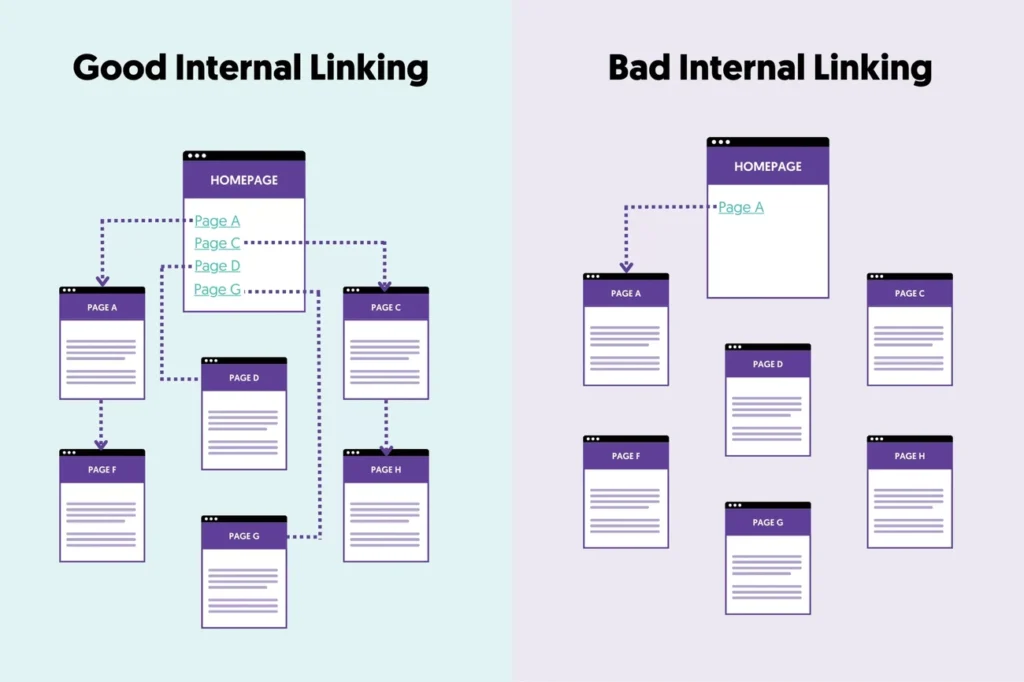
Image Source: Reliablesoft: Digital Marketing Training & Consulting
Internal linking represents one of the most underrated levers in SEO, yet it’s among the common SEO mistakes to avoid. Connect pages with strategy and you signal which content deserves authority while helping search engines understand your site’s structure.
Why Internal Links Matter for SEO
Internal links help search engines find, understand, and prioritize your content. Link related pages together and you signal which pages are most important, how they’re connected, and what topics your site covers. This improves crawl efficiency, supports faster indexing, and helps distribute authority across your site.
They establish relationships between topics and reinforce your expertise in specific subject areas. Someone lands on a blog post and finds helpful paths forward. They stay longer and explore more pages. These behavioral signals help search engines infer that your content is valuable.
Common Internal Linking Errors
The most common internal linking issues include broken links leading to 404 errors, orphan pages with no incoming internal links, and using nofollow attributes that prevent passing link equity. Excessive on-page links dilute value. Pages buried too deep in site structure and generic anchor text like “click here” provide no context.
How to Fix Your Internal Link Structure
Prioritize contextual links over navigational ones, as they pass more SEO value. Publish new content and revisit older articles. Add contextual links where topics naturally overlap. Run regular audits to identify broken links, orphan pages, and redirect chains. Fix broken links, link to orphaned pages from relevant content, and ensure important pages sit within three clicks of your homepage.
Best Practices for Anchor Text
Use descriptive anchor text that tells search engines what the linked page is about. Keep anchor text concise and limit it to five words or fewer. Vary your anchor text to avoid over-optimization. Instead of “click here,” use phrases like “internal linking best practices” that provide context. Descriptive anchor text reinforces topical relevance and improves ranking ability for specific terms.
Comparison Table
| SEO Mistake | The Problem | Effect on SEO | Core Statistics/Facts | Primary Fix/Solution | Tools/Resources Mentioned |
|---|---|---|---|---|---|
| Targeting the Wrong Keywords | Chasing high-volume generic keywords without thinking about competition or intent; unclear search intent with short-tail keywords | Generic terms rarely deliver qualified traffic that converts; brutal competition for broad terms | Long-tail keywords convert at 36% average rate vs. 11.45% for highest-performing landing pages | Change focus to long-tail keywords (3+ words) that balance specificity with realistic ranking potential; match content to search intent | Semrush Keyword Magic Tool (27.2 billion keywords), Google Search Console, KWFinder, Ubersuggest |
| Publishing Low-Quality Content | Content lacking important dimensions, thin content, keyword stuffing, lack of E-E-A-T (Experience, Expertise, Authoritativeness, Trustworthiness) | Harmful content triggers penalties; site-wide signal reduces visibility of whole site; affects time on site, bounce rate and dwell time | 53% of users would avoid a business with incorrect information online; Panda algorithm update (2011) targets thin content | Conduct detailed content audit; expand thin pages with useful information, unite duplicate content, or remove pages with no search value | Screaming Frog (word count analysis), Google Search Console Performance report, Google’s Search Quality Evaluators Guidelines |
| Forgetting Local SEO Signals | Not claiming Google Business Profile, incorrect categories, inconsistent NAP (Name, Address, Phone) data, review neglect | Determines appearance in Local Pack (top 3 local results); affects relevance, distance and prominence factors | 76% of smartphone local searches lead to business visit within a day; 28% result in purchase; first result gets 27.6% CTR; only 35% of SMBs have Google Business Profiles | Claim and optimize Google Business Profile; ensure NAP consistency across all directories; request and respond to reviews | Semrush Review Management (scans 70+ directories), Google’s Structured Data Markup Helper, Google Business Profile Performance dashboard |
| Overlooking Site Speed and User Experience | Slow page load times, poor Core Web Vitals scores (LCP, INP, CLS), unoptimized images, slow server response | Direct ranking factor since 2010; Speed Update (2018) for mobile; Core Web Vitals part of algorithm since 2021 | Sites loading in 1 second convert 3x higher than 5-second loads; 53% of mobile users abandon sites taking >3 seconds; 90% bounce probability after 5 seconds | Compress and optimize images (60-70% of webpage size); enable Gzip compression; implement browser caching; upgrade hosting; use CDN | PageSpeed Insights, TinyPNG, WebP format, Content Delivery Networks (CDN), Google Search Console |
| Making Internal Linking Mistakes | Broken links (404 errors), orphan pages with no incoming links, nofollow attributes preventing link equity, excessive on-page links, generic anchor text | Affects crawl efficiency, indexing speed and authority distribution; affects how search engines find and prioritize content | Not mentioned | Prioritize contextual links over navigational; use descriptive anchor text (5 words or fewer); fix broken links right away; ensure important pages within 3 clicks of homepage | Not mentioned |
The most common and critical SEO mistakes to avoid
Here are the most common and critical SEO mistakes to avoid. Search engines (especially Google) have become significantly smarter with AI integration (like Search Generative Experience/AI Overviews), making old “tricks” not just ineffective, but potentially harmful.
🚨 Critical Technical & Structural Mistakes
- Ignoring Core Web Vitals (CWV)
The Mistake: Having a slow-loading site, poor interactivity (INP), or visual instability (CLS).
Why it hurts: Google explicitly uses CWV as a ranking factor. In 2026, user experience is paramount. If your site feels sluggish, users bounce, and rankings drop.
Fix: Optimize images, use modern formats (WebP/AVIF), minimize JavaScript, and use a CDN. - Poor Mobile Optimization
The Mistake: Designing for desktop first and treating mobile as an afterthought.
Why it hurts: Google uses Mobile-First Indexing. If your mobile site is hard to navigate, has tiny text, or broken elements, you will not rank well, even for desktop searches.
Fix: Use responsive design, ensure touch targets are large enough, and test regularly on real devices. - Broken Links & 404 Errors
The Mistake: Letting internal and external links rot over time.
Why it hurts: It wastes crawl budget, frustrates users, and signals to Google that your site is poorly maintained.
Fix: Regularly audit your site using tools like Screaming Frog or Ahrefs. Redirect (301) relevant deleted pages or fix broken links. - Blocking Search Engines Accidentally
The Mistake: Leavingnoindextags on important pages or blocking resources inrobots.txtduring development and forgetting to remove them.
Why it hurts: Your pages simply won’t appear in search results.
Fix: Check yourrobots.txtfile and meta robots tags regularly, especially after site migrations or updates.
📝 Content & On-Page Mistakes
- Writing for Search Engines, Not Humans
The Mistake: Keyword stuffing, unnatural language, or creating content solely to target a keyword without providing value.
Why it hurts: Google’s AI (BERT, MUM, etc.) understands context and intent. Thin, robotic content is easily identified and deprioritized.
Fix: Focus on E-E-A-T (Experience, Expertise, Authoritativeness, Trustworthiness). Write helpful, comprehensive content that answers the user’s question better than competitors. - Ignoring Search Intent
The Mistake: Creating a blog post when users want a product page, or vice versa.
Why it hurts: If your content doesn’t match what the user is looking for (Informational, Navigational, Commercial, Transactional), they will bounce immediately. High bounce rates signal low relevance.
Fix: Analyze the top 10 results for your target keyword. What format are they? (Video, listicle, product page?) Match that format. - Duplicate Content Issues
The Mistake: Publishing identical or near-identical content across multiple URLs (e.g., printer-friendly versions, HTTP vs HTTPS, www vs non-www).
Why it hurts: Google struggles to decide which version to rank, often splitting link equity or ranking neither.
Fix: Use canonical tags (rel="canonical") to point to the preferred version. Ensure consistent URL structures. - Neglecting Title Tags & Meta Descriptions
The Mistake: Using default titles, leaving them blank, or writing vague descriptions.
Why it hurts: Title tags are a primary ranking signal. Meta descriptions influence click-through rate (CTR). Low CTR can indirectly hurt rankings.
Fix: Write unique, compelling title tags (under 60 chars) and meta descriptions (under 160 chars) that include the primary keyword and a call to action.
🔗 Off-Page & Authority Mistakes
- Buying Links or Participating in Link Schemes
The Mistake: Purchasing backlinks, exchanging links excessively, or using private blog networks (PBNs).
Why it hurts: This is a direct violation of Google’s Spam Policies. Manual actions or algorithmic penalties can destroy your visibility overnight.
Fix: Earn links naturally through high-quality content, digital PR, and genuine outreach. Focus on relevance and authority, not just quantity. - Ignoring Local SEO (For Local Businesses)
The Mistake: Not claiming or optimizing your Google Business Profile (GBP), having inconsistent NAP (Name, Address, Phone) data across directories.
Why it hurts: You’ll miss out on high-intent local searches and Google Maps visibility.
Fix: Claim your GBP, keep information accurate, encourage reviews, and ensure consistency across all online directories.
🤖 Modern/AI-Specific Mistakes (2024-2026)
- Publishing Unedited AI-Generated Content
The Mistake: Mass-producing articles using AI without human review, fact-checking, or adding unique insights.
Why it hurts: Google doesn’t penalize AI content per se, but it penalizes low-quality, unoriginal content. AI content often lacks depth, personal experience, and unique value, leading to poor performance.
Fix: Use AI as a tool for research and drafting, but always add human expertise, original data, personal anecdotes, and rigorous editing. - Not Optimizing for AI Overviews (SGE)
The Mistake: Ignoring structured data and clear, concise answers to common questions.
Why it hurts: AI Overviews often pull answers from well-structured, authoritative sources. If your content is messy or lacks clear headings/lists, you’re less likely to be featured.
Fix: Use schema markup, answer questions directly in the first paragraph, use bullet points, and structure content logically with H2/H3 tags. - Neglecting Video & Visual Search
The Mistake: Only focusing on text-based content.
Why it hurts: Search is becoming more visual. Google Lens and video carousels are prominent.
Fix: Optimize images with alt text, create video content (YouTube is the 2nd largest search engine), and use video schema.
✅ Quick SEO Audit Checklist
Is my site fast and mobile-friendly?
Are my title tags unique and descriptive?
Does my content match user intent?
Have I fixed broken links?
Is my content original, helpful, and E-E-A-T focused?
Am I earning links naturally, not buying them?
Is my Google Business Profile optimized (if local)?
Have I used structured data where appropriate?
Avoiding these mistakes won’t guarantee #1 rankings, but it will prevent you from sabotaging your own efforts. SEO is a marathon, not a sprint—focus on sustainable, user-first practices.
Conclusion
Fixing these SEO mistakes doesn’t require a complete site overhaul. You can start small and build momentum. Audit your current keyword strategy first and move toward long-tail terms that match user intent. Review your existing content next and expand, combine or remove thin pages. Claim your Google Business Profile after that and ensure NAP consistency across directories.
Don’t try tackling everything at once. Pick one mistake from this list, implement the fixes and monitor results. Addressing just two or three of these issues will improve your rankings within weeks. The sites ranking above you got these fundamentals right, that’s all.
FAQs
Q1. What are long-tail keywords and why do they perform better than generic keywords? Long-tail keywords are highly specific search queries containing three or more words, such as “women’s running shoes for flat feet” instead of just “running shoes.” They perform significantly better because they face less competition, attract users with clear intent who are ready to take action, and convert at an impressive 36% average rate compared to just 11.45% for the highest-performing landing pages. These specific phrases also align better with voice search and conversational AI queries.
Q2. How does Google determine what counts as low-quality content? Google identifies low-quality content through several factors including thin content with very little useful information, keyword stuffing, lack of E-E-A-T (Experience, Expertise, Authoritativeness, and Trustworthiness), and content that doesn’t serve user needs. The search engine also monitors user behavior signals like bounce rate, time on site, and dwell time. Content written by someone without experience or expertise in the topic, or pages that are auto-generated without proper editing, will be flagged as low-quality.
Q3. Why is local SEO important for businesses and what’s the biggest mistake to avoid? Local SEO is crucial because 76% of smartphone users who perform local searches visit a related business within a day, and 28% of those searches result in a purchase. The biggest mistake is failing to claim your Google Business Profile—only 35% of small and medium businesses have done this. Other critical errors include choosing incorrect business categories, having inconsistent NAP (Name, Address, Phone) information across directories, and neglecting to respond to customer reviews.
Q4. How much does page speed actually impact search rankings and conversions? Page speed has a dramatic impact on both rankings and revenue. Sites that load in one second convert three times higher than those taking five seconds. Additionally, 53% of mobile users abandon sites that take longer than three seconds to load, and the bounce probability jumps to 90% after five seconds. Google has used site speed as a confirmed ranking factor since 2010, and Core Web Vitals became part of the algorithm in 2021.
Q5. What are the most common internal linking mistakes and how should anchor text be used? The most common internal linking mistakes include broken links leading to 404 errors, orphan pages with no incoming links, using generic anchor text like “click here,” and burying important pages too deep in the site structure. Best practice is to use descriptive anchor text limited to five words or fewer that clearly indicates what the linked page is about, such as “internal linking best practices” instead of vague phrases. Contextual links within content pass more SEO value than navigational links.


