Introduction to WordPress SEO
In today’s digital age, having a strong online presence is crucial for any business or individual wanting to make an impact. As more people turn to the internet to find products, services, and information, ensuring your website stands out becomes increasingly important. WordPress, being one of the most popular content management systems, offers a robust platform for creating websites. However, to truly unlock its potential, you need to understand and implement effective WordPress SEO strategies.
Search Engine Optimization (SEO) is the process of enhancing your website to increase its visibility when people search for products or services related to your business on Google, Bing, and other search engines. A well-optimized website attracts more traffic, which can lead to increased engagement, conversions, and revenue. As we delve into WordPress SEO, you’ll find that it’s not just about keywords, but a comprehensive approach to content, design, and usability.
In this article, I will guide you through the top 5 WordPress SEO strategies you need to implement, explaining why they are crucial, and offering insights into how you can effectively apply them to your site. Whether you’re a seasoned webmaster or a beginner just starting, this guide will provide you with the knowledge you need to elevate your WordPress site to new heights.
Why SEO is Crucial for WordPress Websites
SEO is more than just a marketing buzzword; it is a fundamental aspect of online success. For WordPress websites, SEO is particularly crucial because it directly affects how easily potential visitors can find your site. Without proper SEO, even the most beautifully designed website can remain unnoticed in the vast ocean of the internet. This is where the importance of SEO strategies comes into play.
Search engines are the primary source of traffic for most websites. By optimizing your WordPress site for search engines, you increase the likelihood of being discovered by users interested in your content. Effective SEO can lead to higher rankings in search engine results pages (SERPs), which translates to more clicks and visits. This increased visibility can significantly impact your brand’s reputation and reach.
Moreover, SEO is not just about attracting any visitors but attracting the right ones. By targeting specific keywords and optimizing your content, you draw in individuals who are genuinely interested in what you offer. This targeted traffic is more likely to engage with your content, make purchases, or become loyal followers, ultimately benefiting your site’s performance and success.
Top 5 WordPress SEO Strategies You Need to Implement
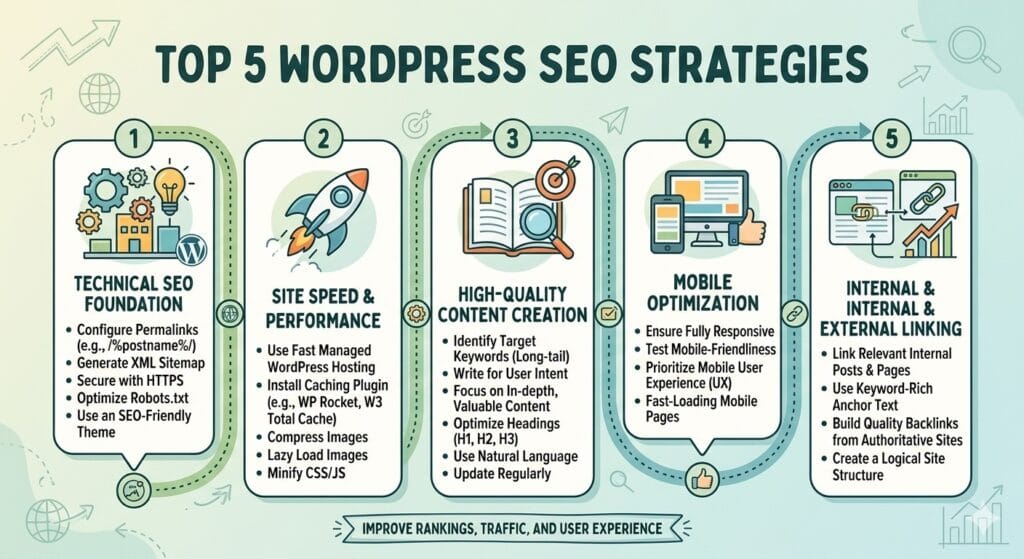
Here are the top 5 most impactful WordPress SEO strategies, focusing on technical foundation, content quality, and user experience.
1. Master Technical SEO with a Robust Plugin
WordPress is SEO-friendly out of the box, but it needs configuration. Don’t rely on default settings.
- Action: Install a comprehensive SEO plugin like Rank Math, Yoast SEO, or All in One SEO (AIOSEO).
- Key Setup Tasks:
- Generate and submit an XML Sitemap to Google Search Console.
- Configure robots.txt to prevent indexing of admin pages or duplicate content.
- Set up Schema Markup (structured data) for articles, products, or local business info to help Google understand your content context.
- Optimize permalinks to use the “Post name” structure (e.g.,
yoursite.com/seo-tips) rather than default IDs.
2. Prioritize Core Web Vitals & Site Speed
Google’s ranking algorithm heavily weighs user experience metrics, specifically Core Web Vitals (LCP, FID, CLS). A slow site hurts rankings and conversions.
- Action: Optimize for speed without sacrificing functionality.
- Key Steps:
- Use a caching plugin (e.g., WP Rocket, W3 Total Cache, or LiteSpeed Cache).
- Compress images using next-gen formats like WebP and implement lazy loading.
- Choose a performance-optimized hosting provider (avoid shared hosting if possible; consider Kinsta, WP Engine, or Cloudways).
- Minify CSS/JavaScript files and remove unused plugins that add bloat.
3. Create Intent-Driven, E-E-A-T Content
Google’s helpful content update prioritizes content that demonstrates Experience, Expertise, Authoritativeness, and Trustworthiness (E-E-A-T). Keyword stuffing is dead; user intent is king.
- Action: Write for humans first, search engines second.
- Key Steps:
- Conduct keyword research to identify user intent (informational, commercial, transactional).
- Structure content with clear H1, H2, and H3 headings for readability and crawlability.
- Include original insights, data, or personal experience to differentiate from AI-generated generic content.
- Update old content regularly to keep it fresh and relevant (content decay hurts rankings).
4. Build a Strategic Internal Linking Structure
Internal links help Google crawl your site, understand page hierarchy, and distribute “link equity” (authority) across your pages.
- Action: Create a topic cluster model.
- Key Steps:
- Identify pillar pages (broad overview topics) and create cluster content (specific subtopics) that link back to the pillar.
- Use descriptive anchor text (e.g., “learn more about WordPress SEO” instead of “click here”).
- Audit existing content to add internal links to newer, relevant posts.
- Ensure no important page is more than 3 clicks away from the homepage.
5. Optimize for Mobile-First Indexing
Google uses mobile-first indexing, meaning it primarily uses the mobile version of your site for ranking and indexing. If your mobile experience is poor, your desktop rankings will suffer too.
- Action: Ensure a seamless mobile experience.
- Key Steps:
- Use a responsive WordPress theme that adapts to all screen sizes.
- Test your site with Google’s Mobile-Friendly Test tool.
- Avoid intrusive pop-ups that block content on mobile devices.
- Ensure buttons and touch elements are adequately spaced for finger navigation.
🚀 Quick Win Checklist:
- [ ] Install & configure an SEO plugin (Rank Math/Yoast).
- [ ] Connect to Google Search Console & Bing Webmaster Tools.
- [ ] Run a speed test (PageSpeed Insights) and fix critical issues.
- [ ] Audit top 10 pages for keyword optimization and internal links.
- [ ] Verify mobile responsiveness on multiple devices.
By focusing on these five areas, you build a sustainable SEO foundation that adapts to algorithm changes and drives long-term organic growth.
By incorporating these strategies, you lay a foundation for a successful WordPress site that attracts traffic and keeps users engaged.
Tips for Beginners on Implementing SEO Strategies
If you’re new to WordPress SEO, implementing these strategies may seem overwhelming. Here are some tips to help you get started:
- Start Small: Focus on one strategy at a time. Begin with keyword research and optimization, then gradually move on to content creation and other techniques.
- Educate Yourself: Take advantage of online resources, tutorials, and courses to enhance your understanding of SEO fundamentals.
- Use SEO Tools: Utilize tools like Google Analytics and Google Search Console to monitor your site’s performance and identify areas for improvement.
- Stay Updated: SEO is an ever-evolving field. Keep up with the latest trends and algorithm updates to ensure your strategies remain effective.
- Be Patient: SEO results take time. It’s important to remain patient and consistent in your efforts, as improvements in search rankings may not happen overnight.
For beginners, WordPress SEO can feel overwhelming. You don’t need to be a technical expert to rank well. Here are the 5 most essential, high-impact strategies that are easy to implement and yield quick results.
1. Install an SEO Plugin & Run the Setup Wizard
You don’t need to code SEO into your site. A plugin handles the heavy lifting.
- Why: It automates technical tasks like creating sitemaps, adding meta tags, and optimizing content structure.
- Best Tools: Rank Math (great free features) or Yoast SEO (user-friendly for beginners).
- Beginner Action:
- Install the plugin from the WordPress dashboard.
- Run the Setup Wizard. It will ask simple questions (e.g., “Is this a blog or a store?”) and configure the best settings for you.
- Connect it to Google Search Console (the plugin usually guides you through this). This lets Google know your site exists.
2. Write Click-Worthy Titles & Meta Descriptions
This is what users see in Google search results. If it’s boring, no one clicks—even if you rank #1.
- Why: Higher click-through rates (CTR) signal to Google that your content is valuable, which can boost rankings.
- Beginner Action:
- In your post editor, scroll down to the SEO plugin section.
- Title: Keep it under 60 characters. Include your main keyword near the front. Make it compelling (e.g., “10 Easy WordPress SEO Tips for Beginners” vs. “SEO Tips”).
- Meta Description: Write a 150–160 character summary that acts as an ad. Include a call-to-action (e.g., “Learn how to boost your traffic today…”).
3. Optimize Your Images (Before You Upload)
Large, unoptimized images are the #1 reason WordPress sites load slowly. Slow sites rank lower.
- Why: Google penalizes slow sites. Also, image alt text helps Google understand what the image is about (image SEO).
- Beginner Action:
- Compress images before uploading. Use free tools like TinyPNG or Squoosh. Aim for files under 100KB where possible.
- Rename files descriptively before uploading (e.g.,
wordpress-seo-tips.jpginstead ofIMG_1234.jpg). - Add Alt Text: In the WordPress media library, fill in the “Alt Text” field with a brief description including your keyword if relevant (e.g., “Chart showing WordPress SEO growth”).
4. Use Keywords Naturally in Headings & Content
Don’t “stuff” keywords. Instead, place them where Google expects to see them.
- Why: It helps Google understand what your page is about without making it read like spam.
- Beginner Action:
- Pick one main keyword per post (e.g., “best coffee beans”).
- Include it in:
- The H1 Title (your post title).
- The first 100 words of your introduction.
- At least one H2 subheading.
- Naturally throughout the body text (2–3 times for a 1,000-word post).
- Use the SEO plugin’s content analysis (the green/red lights) as a guide, but don’t obsess over getting a perfect score if it makes your writing sound robotic.
5. Internal Linking: Link to Your Own Content
Connect your new posts to your older, relevant posts.
- Why: It keeps visitors on your site longer (lowering bounce rate) and helps Google discover and index all your pages.
- Beginner Action:
- When publishing a new post, ask: “Do I have any older posts that relate to this?”
- Add 2–3 links from your new post to those older posts.
- Go back to those older posts and add a link back to your new post if it makes sense.
- Use descriptive anchor text (e.g., “check out our guide on image optimization” instead of “click here”).
🎯 Beginner’s Quick-Start Checklist
| Task | Time Required | Impact |
|---|---|---|
| Install Rank Math/Yoast & run wizard | 15 mins | ⭐⭐⭐⭐⭐ |
| Optimize titles & meta descriptions for top 5 posts | 30 mins | ⭐⭐⭐⭐ |
| Compress & rename images for next post | 5 mins/post | ⭐⭐⭐⭐ |
| Add main keyword to H1, intro, and one H2 | 5 mins/post | ⭐⭐⭐ |
| Add 2–3 internal links in each new post | 5 mins/post | ⭐⭐⭐ |
Pro Tip: Don’t try to do everything at once. Start with Strategy #1 (Plugin Setup). Once that’s done, focus on Strategies #2 and #3 for every new post you write. Consistency beats perfection!
By following these tips, beginners can confidently implement WordPress SEO strategies and start seeing positive results.
Common Mistakes to Avoid in WordPress SEO
While implementing SEO strategies, it’s crucial to avoid common pitfalls that can undermine your efforts. Here are some mistakes to steer clear of:
- Ignoring Mobile Users: Neglecting mobile optimization can result in a poor user experience and negatively impact your search rankings.
- Overusing Keywords: Keyword stuffing can lead to penalties from search engines. Focus on natural and relevant keyword placement.
- Neglecting Meta Tags: Meta titles and descriptions play a vital role in attracting clicks from search results. Ensure they are descriptive and compelling.
- Forgetting Internal Links: Internal linking helps search engines understand the structure of your site and distribute page authority. Don’t overlook this simple yet effective technique.
- Overlooking Analytics: Failing to monitor your site’s performance using tools like Google Analytics can lead to missed opportunities for optimization.
By avoiding these common mistakes, you can ensure your WordPress SEO efforts are effective and sustainable.
The Role of Plugins in WordPress SEO
WordPress plugins are a game-changer when it comes to SEO. They offer a range of features and functionalities that simplify the optimization process. Here’s how they can benefit your site:
- Comprehensive SEO Tools: Plugins like Yoast SEO and All in One SEO Pack provide a suite of tools for optimizing titles, meta descriptions, and more.
- XML Sitemaps: These plugins can automatically generate XML sitemaps, helping search engines understand your site’s structure and index it more efficiently.
- Content Analysis: Some plugins offer content analysis features that assess the readability and SEO-friendliness of your posts, providing recommendations for improvement.
- Social Integration: SEO plugins often include social media integration, allowing you to manage how your content appears when shared on platforms like Facebook and Twitter.
- User-friendly Interface: Most plugins offer intuitive interfaces that make it easy for users of all skill levels to optimize their sites.
By leveraging the power of WordPress plugins, you can enhance your site’s SEO without needing extensive technical knowledge.
How to Measure the Success of Your SEO Efforts
Measuring the success of your SEO efforts is crucial for understanding what’s working and what needs improvement. Here are some key metrics to track:
- Organic Traffic: Monitor the number of visitors coming to your site from search engines. An increase in organic traffic indicates successful SEO efforts.
- Keyword Rankings: Track the rankings of your target keywords to see how well your site is performing in search results.
- Bounce Rate: Analyze the percentage of visitors who leave your site after viewing only one page. A high bounce rate may indicate issues with content or user experience.
- Conversion Rate: Evaluate the percentage of visitors who complete desired actions, such as making a purchase or signing up for a newsletter.
- Backlinks: Keep an eye on the number and quality of backlinks pointing to your site, as they play a significant role in search engine rankings.
By regularly monitoring these metrics, you can gain valuable insights into the effectiveness of your WordPress SEO strategies and make informed decisions for future improvements.
Why Choose a WordPress SEO Strategy Consultant?
While implementing SEO strategies can be done independently, working with a WordPress SEO strategy consultant like Maxsdigit can provide significant benefits. Here’s why you might consider enlisting expert help:
- Expertise and Experience: SEO consultants bring a wealth of knowledge and experience to the table, ensuring your strategies are effective and up-to-date.
- Time Savings: By outsourcing your SEO efforts, you can focus on other aspects of your business while experts optimize your site.
- Customized Solutions: Consultants offer tailored strategies that align with your specific goals and target audience, maximizing your site’s potential.
- Performance Monitoring: A consultant can continuously monitor your site’s performance, providing regular reports and recommendations for improvement.
- Competitive Edge: With a professional guiding your SEO efforts, you can gain an edge over competitors and achieve better search rankings.
Choosing a WordPress SEO strategy consultant can be a valuable investment, especially if you’re looking to take your site to the next level.
Conclusion: Elevate Your WordPress Site with Effective SEO
In conclusion, implementing the top 5 WordPress SEO strategies can significantly impact your site’s visibility, engagement, and overall success. From keyword research and content creation to mobile optimization and plugin utilization, each strategy plays a crucial role in enhancing your site’s performance. By avoiding common mistakes and measuring your efforts, you can ensure your WordPress site achieves its full potential.
If you’re new to SEO, remember that patience and persistence are key. The results may not be immediate, but with consistent effort, you’ll see positive changes over time. For those seeking to accelerate their SEO success, considering a consultant like Maxsdigit can provide valuable guidance and expertise.
Take the first step towards unlocking your WordPress site’s potential by implementing these strategies today. Let’s transform your website into a powerful tool for attracting, engaging, and converting your target audience.
Ready to elevate your WordPress site with effective SEO? Contact Maxsdigit today for expert guidance and tailored strategies that drive results. Let’s embark on this journey to success together!


